
Deliver Your Subsurface Projects in Interactive, True 3D — Not Static Slides
Stop sending screenshots. Present your geodata and models in interactive 3D spaces that can be explored, annotated, and shared instantly.
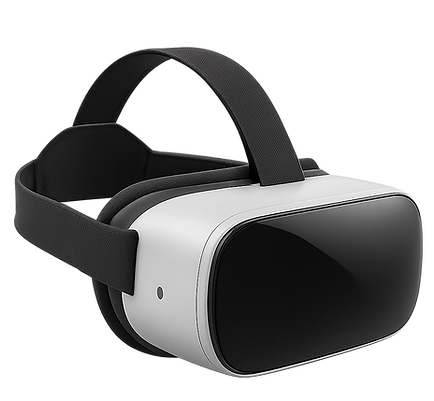

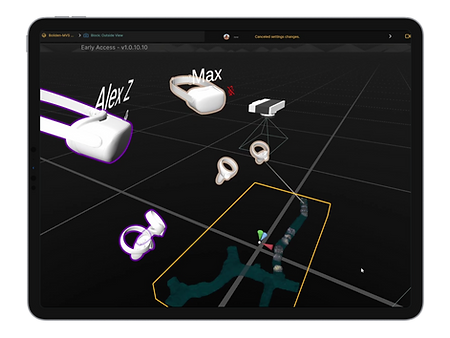
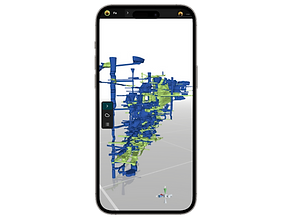
LiquidEarth is compatible with Windows, macOS, iPadOS, iOS, Android, and the Meta Quest platform.

Visualize Subsurface Data in True 3D
Explore geological models, drillholes, geophysical volumes, and other key subsurface datasets in an intuitive, fully interactive 3D environment.
Annotate
& Interpret
Track and mark insights with text, sketches, viewpoints, and more — making your observations and interpretations easy to revisit and share.
Create Impactful
3D Presentations
Lead clients and stakeholders through structured project walkthroughs — or let them explore freely in 3D, guided by contextual annotations.
Share Projects Instantly, With Anyone
Share a simple link and let others join your 3D project as guest viewers — no signup needed, just a quick install.
Collaborate in
Real Time, in 3D
Join colleagues or stakeholders in the same 3D space, interact live with data, and communicate using built-in voice chat.
Access Anywhere, Across Devices
From office PCs to field tablets and XR headsets — LiquidEarth runs across modern hardware without heavy setup.
How It Works:
From Data to Engaging 3D Spaces
Whether you're a geoscientist, engineer, consultant, or educator: Here's how LiquidEarth helps turn your raw data into impactful, shareable 3D spaces.
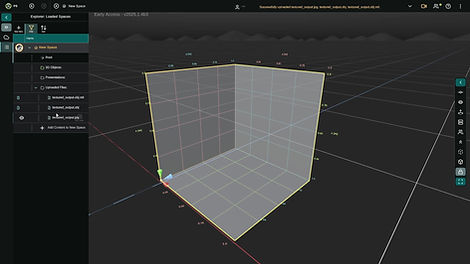
1. Import Your Data
Bring your geoscience and subsurface data into interactive 3D spaces in LiquidEarth.
Our in-app workflow supports importing meshes, boreholes, raster images, and voxel volumes — with a growing range of formats being added based on user needs.
Need assistance? We also offer support and services to help you optimize and integrate your data for the best experience across platforms.
2. Highlight What Matters
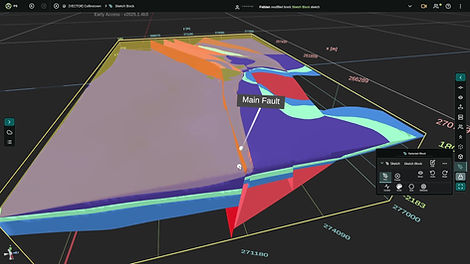
Mark key insights and add context, whether for your own interpretation or to communicate your work clearly.
LiquidEarth offers a range of visualization and inspection tools to help you understand your data in 3D. Use annotations to add spatial notes, sketch features, link resources, or save and revisit specific viewpoints.
Looking for a more guided experience? We can help you create custom, step-by-step walkthroughs tailored to your audience.
3. Share, Present, and Collaborate Live
Invite others to your project to present results or discuss interpretations in real time and true 3D.
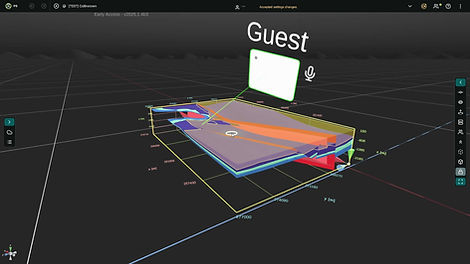
Share projects directly in the app to add team members as permanent collaborators, or send sharing links to let external clients and stakeholders join instantly as guest viewers — no signup required, just a quick install.
Meet in LiquidEarth to exchange insights, inspect data together, and engage your audience directly. Instead of sending static slides, guide them through an immersive 3D environment.
Explore Examples in LiquidEarth
Get to know LiquidEarth through real-world 3D geoscience datasets and models.
Try it for free — no signup required. Click a link, install the app, and start exploring as a guest viewer.
Note: These spaces are public and free to view. When you join, you may encounter other users viewing the same project.
You can disable live collaboration via the top bar in the app.

Mineral Exploration
Spremberg Copper
Exploration Project
Lusatia, Germany – VECTOR Project
Explore multiple types of subsurface data brought together in one district-scale 3D space. It was set up and annotated to support understanding and communication as part of the European project VECTOR.

Mineral Exploration
Stonepark Zinc-Lead
Exploration Project
Limerick, Ireland – VECTOR Project
View a 3D geological model related to the Stonepark zinc-lead deposit, focused on key formations and structures. It was set up and annotated to support outreach as part of the European project VECTOR.

Mining
Underground Mine Gallery &
3D Face Scans
Captured by Mine Vision Systems
Inspect precision 3D face scans captured with FaceCapture by Mine Vision Systems. Navigate through an underground mine gallery and jump to individual rock faces — all from a safe, remote setting.

Geophysics
Georadar Profiles – Twardowskiego Cave
Kraków, Poland
See Spectral GPR (SGPR) profiles visualized and annotated in 3D. SGPR by WIDMO Spectral Technologies delivers high-resolution subsurface imaging with significantly deeper penetration than conventional GPR.

Field Outcrop
High-Resolution 3D Scan – “The Mother of All Outcrops”
Northeastern Oman
Visit this world-famous outcrop of folded radiolarian chert and porcellanite in LiquidEarth, set up as a high-resolution 3D scan for education and as a practical example of 3D field mapping.
Get Started with LiquidEarth
LiquidEarth is currently in Early Access. Explore the app for free, or contact us for a commercial license.
Coming Soon: Integrated 3D Geomodeling
Our next major release will bring GemPy-based geological modeling directly into LiquidEarth's interactive 3D workspace.
Contact us for a demo or if you’d like to participate in our preview program.


Join the LiquidEarth Community
Stay up-to-date with LiquidEarth! Sign up for our newsletter to receive the latest updates, product releases, news, and special offers straight to your inbox.